Google Hummingbird – what impact will it have on your website's SEO?

Google has announced its new Hummingbird algorithm, raising plenty of questions and concerns among SEO professionals – what does it mean and what impact might this major algorithm update have on your site's rankings?

Although it was announced on 26 September, the truth is that this major search algorithm update (Hummingbird) had already been rolled out and running for at least a month. Anyone paying close attention will certainly have noticed changes both in the behaviour of Google's search results and in the way they are presented.
When Hummingbird launched, Google made it clear that they want to be able to deliver more relevant results for longer, more complex search queries. Google also stressed that Hummingbird is more geared towards presenting ranking information in a more natural way, and this applies especially to anyone who wants to take advantage of the central component of this update: “Conversational Search”. (Conversation Search). This direction is largely driven by the fact that there are more and more mobile users and by the growth of voice search.
To answer these questions and help you carry on planning your SEO strategy wisely, we have written this short guide to clarify how this update affects your website's rankings, which variables to consider, how relevant each of those variables is and which strategies to adopt in order to get the most out of the new update to Google's search algorithm, now known as Hummingbird.
The first challenge Google has to deal with today is the growing number of conversational phrases people use in their web searches. Very likely (and this is especially true for mobile voice search users), those queries will be closer to a “question” style – “how do I …?”, “Where is the nearest …?”, “Where can I get …?”, and so on.
To interpret these longer phrases, Google can no longer rely solely on keywords and return different results for each one of them. What it can do is boil down countless conversational queries into a shorter “general term”, based on the searcher's intent:
Informational
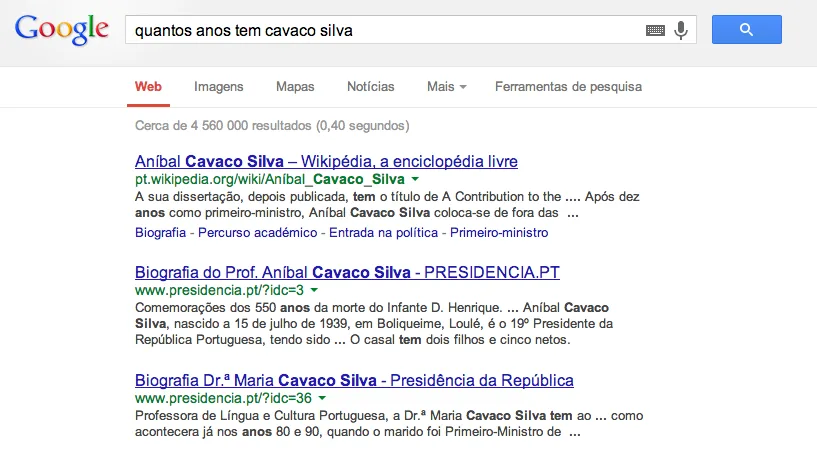
1. The user asks “How old is Cavaco Silva?”, so … 2. The user wants general information about Cavaco Silva, so … 3. Users will find that information in Cavaco Silva's biography (see image)
Navigational
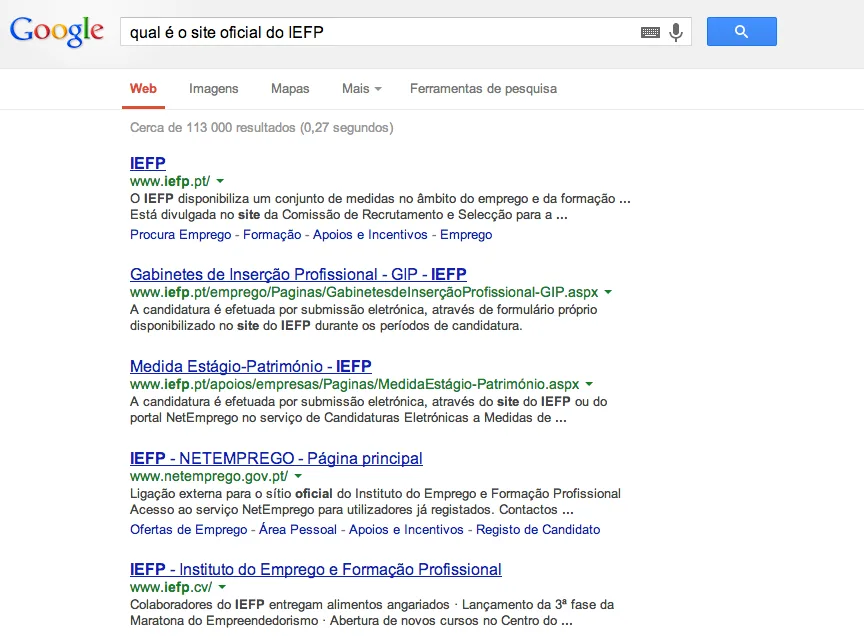
1. The user searches for “What is the official IEFP website”, so … 2. The user wants to get to the IEFP website, so … 3. The user needs results about IEFP, job vacancies (Netemprego) and the Instituto do Emprego e Formação Profissional.
Transactional
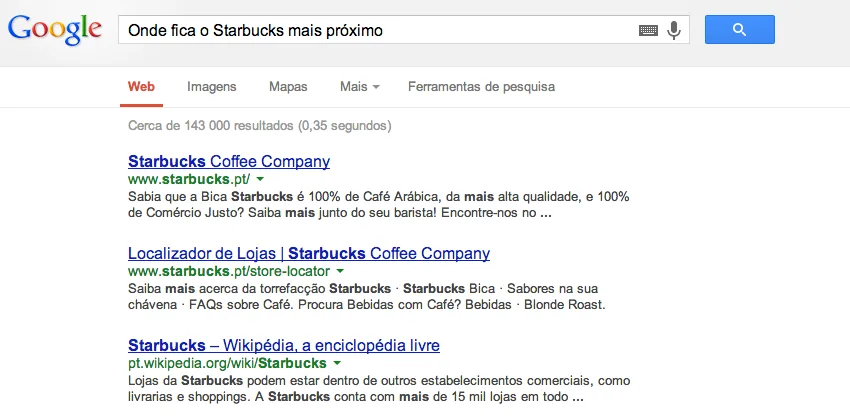
1. The user searches for “Where is the nearest Starbucks”, so … 2. The user wants to find and visit the nearest Starbucks, so … 3. Users will find it using the Starbucks store locator
What should I do?
Try to work out all the conversational phrases people might use when searching for your services, and sort them into informational, navigational and transactional.
Check whether your content covers all three types:
- To cover informational queries, create wikipedia-style content (a teaching approach).
- Navigational queries relate to your brand, your product name, your website name, and so on. One thing that contributes a great deal to higher rankings (for brand-related keywords) is being mentioned in other sources with thematically relevant content.
- For transactional queries, use keywords that suit your content, for example “hire JellyCode – web design company in Portugal”
Wherever possible, target conversational phrases exactly as they are. For the remaining conversational terms, use their shorter equivalents.
Another important step towards delivering relevant results is working out what a page is about not only through individual keywords, but also through their synonyms and co-occurring terms.
In practice, this means Google returns search results not just for the exact phrase the user typed, but for other terms related to the same topic.
For websites that genuinely cover relevant topics, this creates an opportunity for additional exposure. You may well reach the top of Google's rankings not only for the keywords you have chosen, but also for many of their synonyms.
What to do?
Broaden your keyword research, focusing on synonyms and co-occurring terms, to diversify your content:
- To see which search terms Google treats as synonyms, pay attention to related keywords, acronyms or spelling variants of your keywords that are highlighted in the search results:
- Expand your list of synonyms with the keywords that are already bringing traffic to your website (check your site's Google Webmaster Tools and Google Analytics).
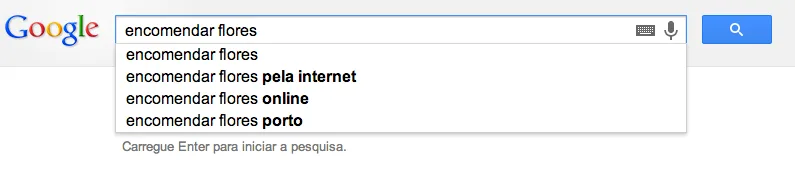
- Look at Google's suggestions for ideas on relevant keywords:
Another way Google works out what your site or your business is about is through co-citation.
Put simply, this mechanism means that every time your brand (or a link to your site) is mentioned alongside your competitors or other similar web sources, it acts as a signal for Google to determine that your company and those other companies are related.
And if your competitors already rank well in your business area, then as far as Google is concerned your site now becomes a significant player in that same business area.
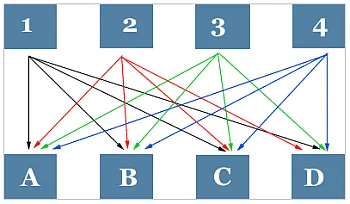
E.g. If your site (1) is mentioned on sites A, B and C, alongside your competitors (2, 3 and 4), Google will associate all 4 sites (see the diagram):
What to do?
Identify your main competitors (the leading names in your business area according to Google) and make sure your brand is mentioned alongside theirs:
- Search Google for “Top 10 …”, “Best of 2013”, and so on. If your company isn't there, get in touch with the publisher and ask to be added to the list.
- Look for other competing brands ranking highly for the keywords in question, to find more citation opportunities.
- Using reverse engineering, try to identify your competitors' backlink profiles to see which sources are linking to them.
Get in touch with JellyCode and find out how our professional SEO services can help with this.
Even though “commercial” anchor text in links remains one of the biggest SEO red flags today, Google still looks at backlink anchor text to better understand what a site is about.
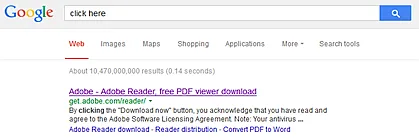
The perfect proof is the famous Adobe.Com example, which (still!) appears at the top of the results if you search for “click here”, purely because of the anchor text of its links:
Take stock of the internal links on your website and see whether you can better optimise the anchor text for semantically relevant keywords. Check the external anchor links pointing to your website to make sure they are relevant enough, or review your anchor text strategy. Remember to use keywords not only in the anchor text itself, but also in the text surrounding the links, including keywords and their synonyms.
E.g.
- To see our Paris holiday packages click here.
- Big discounts on trips to Paris.
- Find great deals here for your trip to Paris.
Another factor to consider in the age of a smarter Google is Universal Search.
There is a strong chance that the new relevance-focused algorithm will lead Google to show more universal search results to its users. For example, if you search for “how to exercise your abs”, Google will understand your intent and, obviously, the most informative result will be an exercise video:

If you want to eat pizza in Lisbon, you clearly need locations:
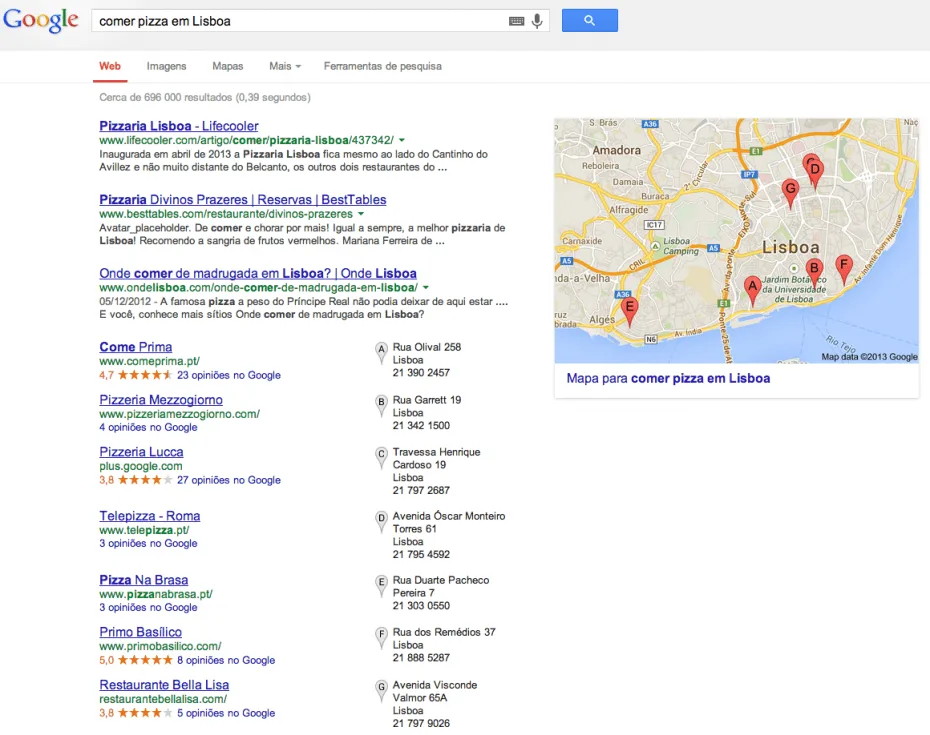
This means that, now more than ever, Universal Search gives you the chance to:
(A) Overtake and displace competitors from the organic top 10, when that once looked unlikely
(B) drive more traffic to your site using additional traffic channels
- Check which types of search results appear in Google for your main keywords,
- Consider setting up a local Google+ listing,
- Optimise your images for Google Images,
- Make videos and optimise them for YouTube.
To gather more information about your website, its topic and its content, Google will pay even more attention to so-called “structured data”. This is the ideal way to gain extra exposure in Google's Knowledge Graph, provide more information through data markup, show authorship for your articles, appear in the search results known as the “carousel”, and so on.
What to do?
- Make sure you use as much structured data as possible, so Google can learn more about your site (use Google+ to promote authorship data on Google, get listed on Freebase to increase your chances of appearing in the Knowledge Graph, and so on),
- To help Google make more sense of your site, try to implement a schema on your site wherever possible (use Schema.org markup for videos, use the Structured Data Markup Helper to let Google know more about films, events, and so on, on your site).
- Use the structured data testing tool to make sure Google is interpreting the structured data on your pages correctly.
With this set of guidelines in hand, it's time to look at your website with Google Hummingbird in mind – we hope this guide has given you a better sense of what the algorithm update is about, and how to keep your site in line with Google's new relevance standards.
Whenever you feel the time is right, we would be delighted to bring our SEO knowledge and experience to bear on giving your website greater visibility and success.
- See what we can do to optimise your website for search engines >
- Find out more about our SEO services >
This article was translated and adapted into Portuguese from its original source at: Linkassistant.com
Published by
JELLYCODE – Web & Graphic Design
Get what we write
No fixed calendar: only when there is something worth your time.