How to implement AI agents in customer service

Gonçalo Malho Rodrigues Founder & CEO @Jelly
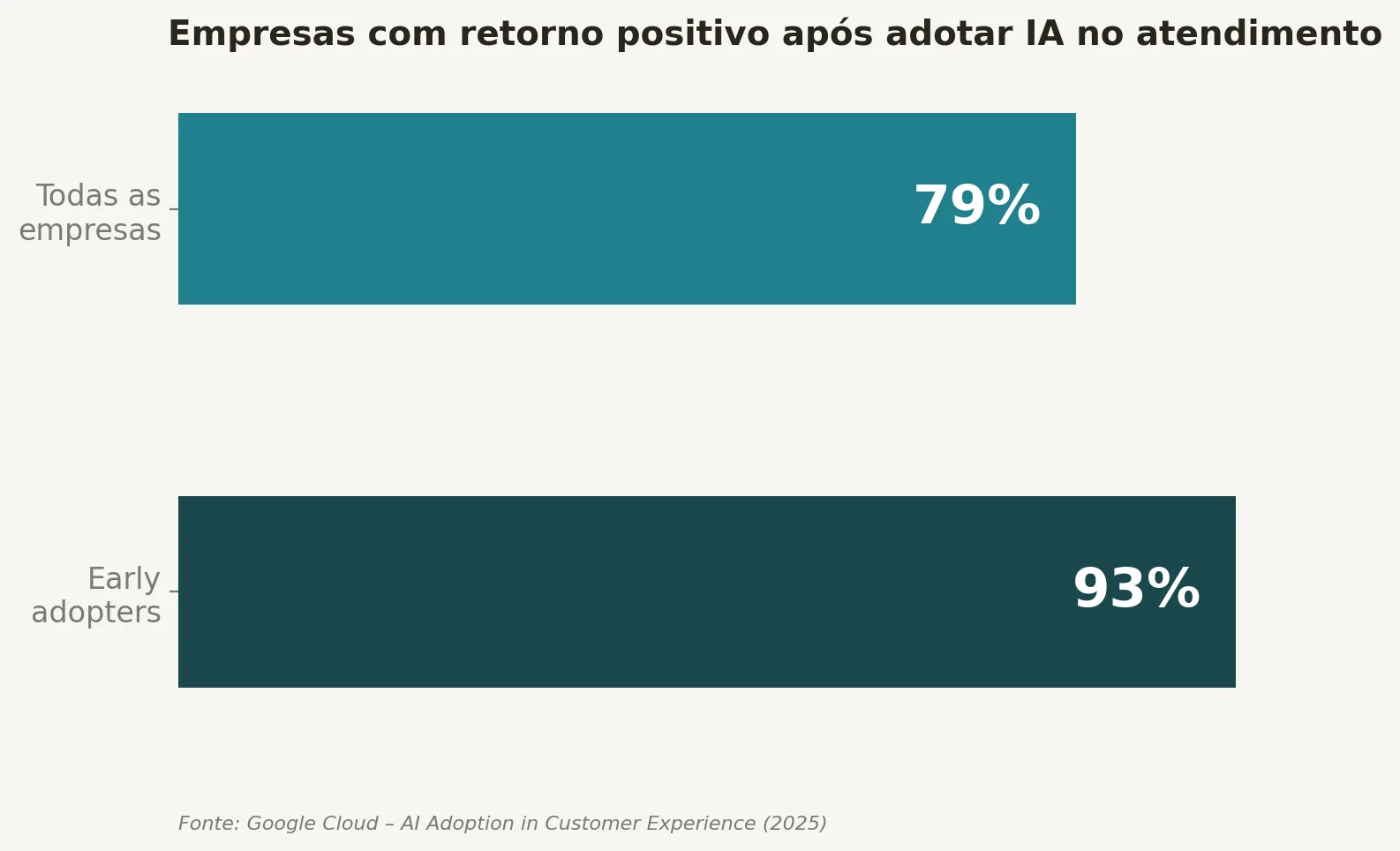
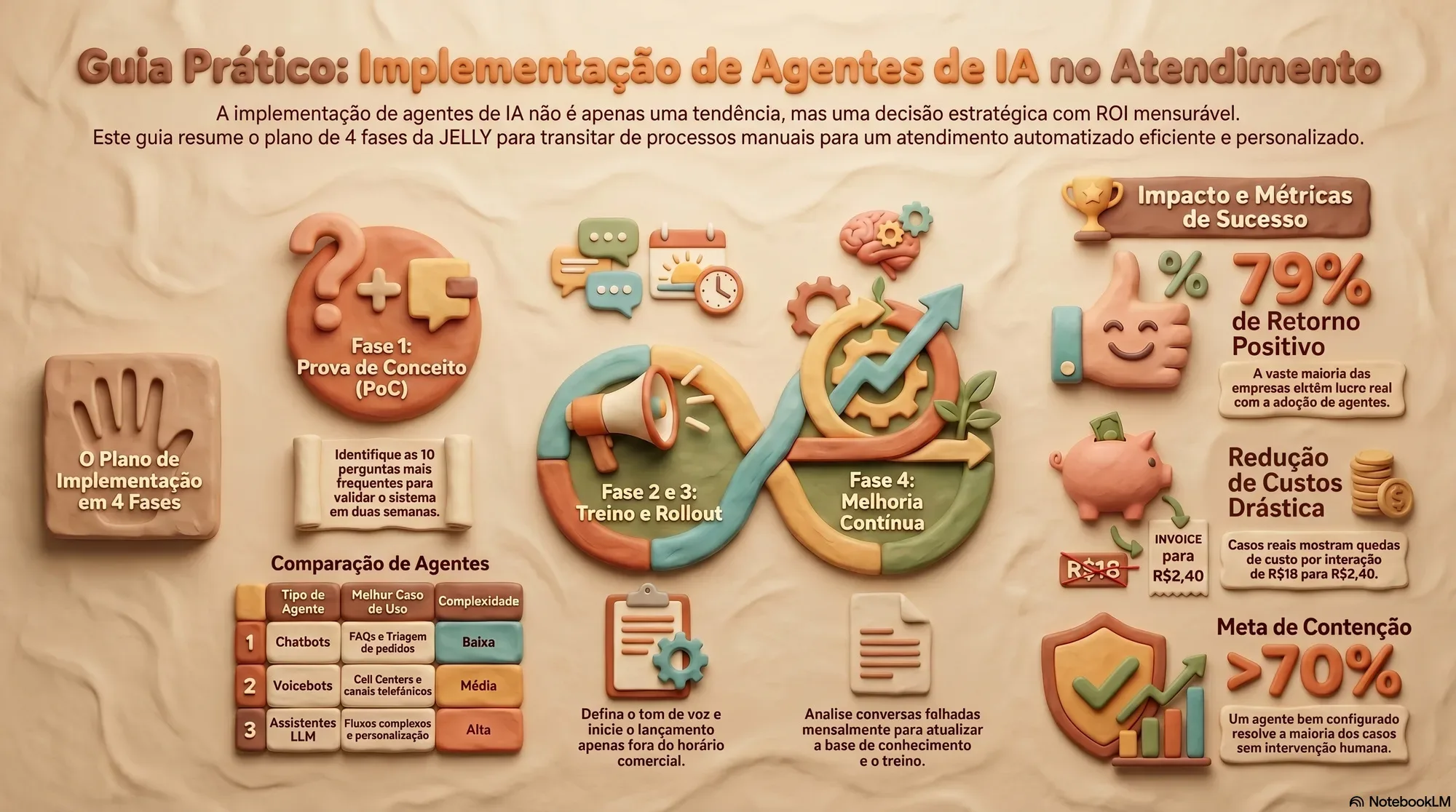
Seventy-nine per cent of companies that adopt AI agents in customer service see a positive return, according to Google Cloud's AI Adoption in Customer Experience study (2025). Among early adopters, that figure rises to 93%. The technology is available, entry costs have fallen considerably in recent years and the results are measurable from the very first weeks. One of the main obstacles still holding most companies back isn't a lack of tools, it's the absence of a clear plan to get started without taking unnecessary risks, alongside challenges such as data quality, integration between systems and organisational resistance to change.
At JELLY, working with clinics, e-commerce businesses and service companies, we keep seeing the same pattern: in our experience, those who start with a well-structured pilot tend to reach measurable results within the first 60 days. Those who try to implement everything at once often end up with a confusing system that teams abandon before it can show any value. This article shows how to use artificial intelligence agents to improve customer service in practical terms: the types of agents available, how to integrate them with your CRM, which metrics to track and the 4-phase plan to get started this week.

The types of AI agents for customer service and how to choose the right one
The type of agent you choose determines implementation speed, cost and expected impact. There are three main categories, each with a distinct purpose. Starting with the wrong type is the most common mistake, and the easiest to avoid with the right information.
Chatbots: the most accessible entry point for triage and FAQs
Text-based chatbots are the quickest option to implement and work very well for handling repetitive queries: order status, opening hours, returns policies, prices. They run on rules or predefined flows and effectively cover the 20% of question types that account for 80% of daily service volume, the Pareto principle applied to support. For any company just starting out with customer support automation, this is the natural entry point and the one that delivers the most predictable short-term return.
Voicebots: voice-based service for telephone channels
Voicebots use natural language processing to interact by voice in real time, making them ideal for call centres or businesses where customers prefer to call rather than write. The most common use cases include call triage, predictive routing and urgency analysis. They require more care in training to ensure comprehension quality, particularly when dealing with variations in accent and sector-specific technical vocabulary. They are also the ones that benefit most from a contained pilot before full rollout, precisely because comprehension errors in voice are more visible to the customer than in a message exchange.
Conversational assistants with LLMs: for complex flows and personalisation
Assistants built on large language models, such as GPT-4 or Claude, can hold context throughout a conversation, personalise responses and carry out multi-step tasks. They are the natural next step once the model has been validated with simpler chatbots. Integrated with CRM and knowledge bases via RAG architectures, they can deliver genuinely contextualised responses, they know who they're talking to and what that person has bought, significantly reducing the time customers spend repeating their history. Predictive capability, such as anticipating needs before they are expressed, is documented in more mature CRM-LLM integrations, but varies according to the quality and completeness of the data available. To understand the differences between an intelligent agent and a traditional chatbot, it may help to consult a comparative guide on AI agent vs chatbot, which explores the advantages and limitations of each approach.
How to use artificial intelligence agents to improve customer service: real cases
Three use cases that consistently deliver quick ROI, whatever the sector, and a fourth worth considering once the implementation has reached a certain level of maturity.
Automatic triage and ticket classification
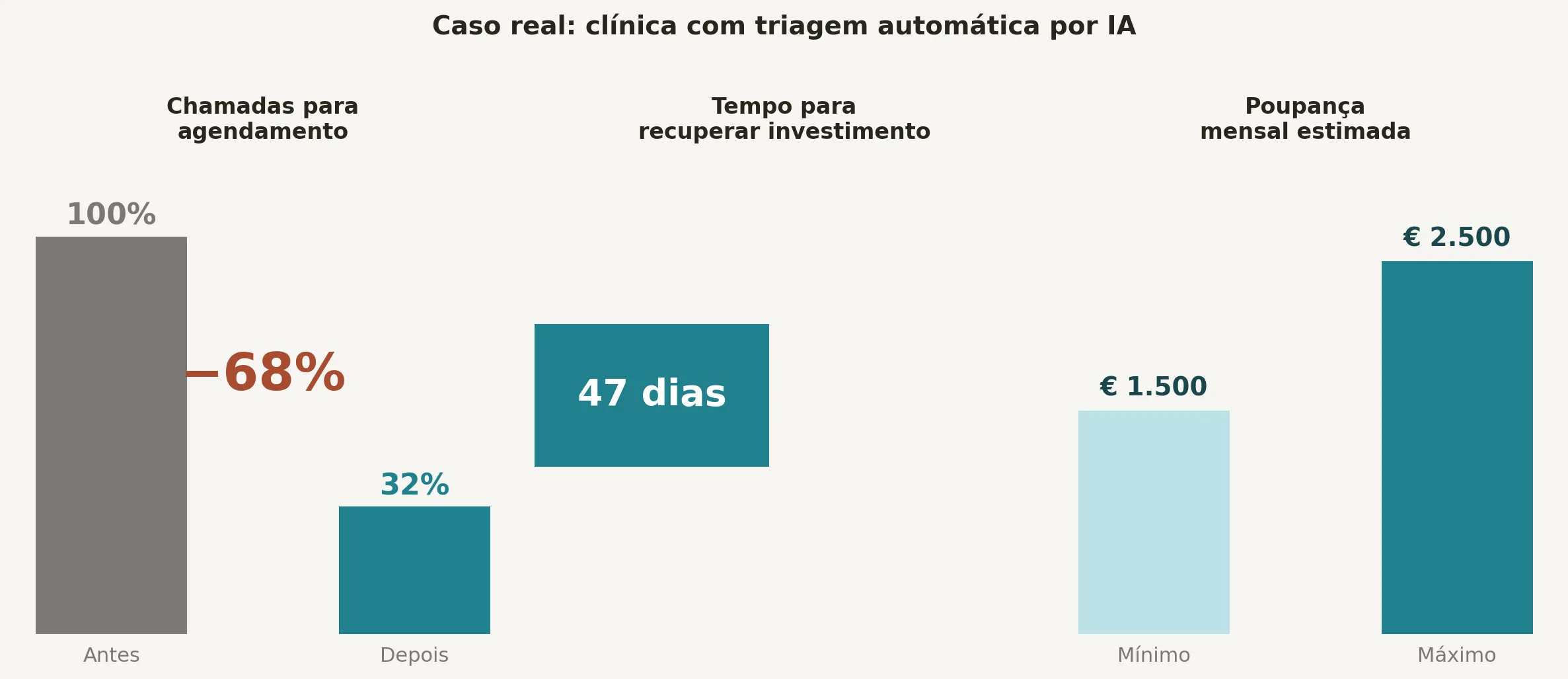
An AI agent analyses the customer's initial message, classifies it by type and urgency and routes it to the right department with no human intervention. One clinic that implemented this flow cut booking calls by 68%, recovering its investment in just 47 days, with monthly savings of between €1,500 and €2,500. The immediate impact is twofold: shorter waiting times for the customer and lower operating costs for the company. Tools and studies on AI agents for customer support show how these flows can be designed to maximise ticket containment.
24-hour support without growing the team
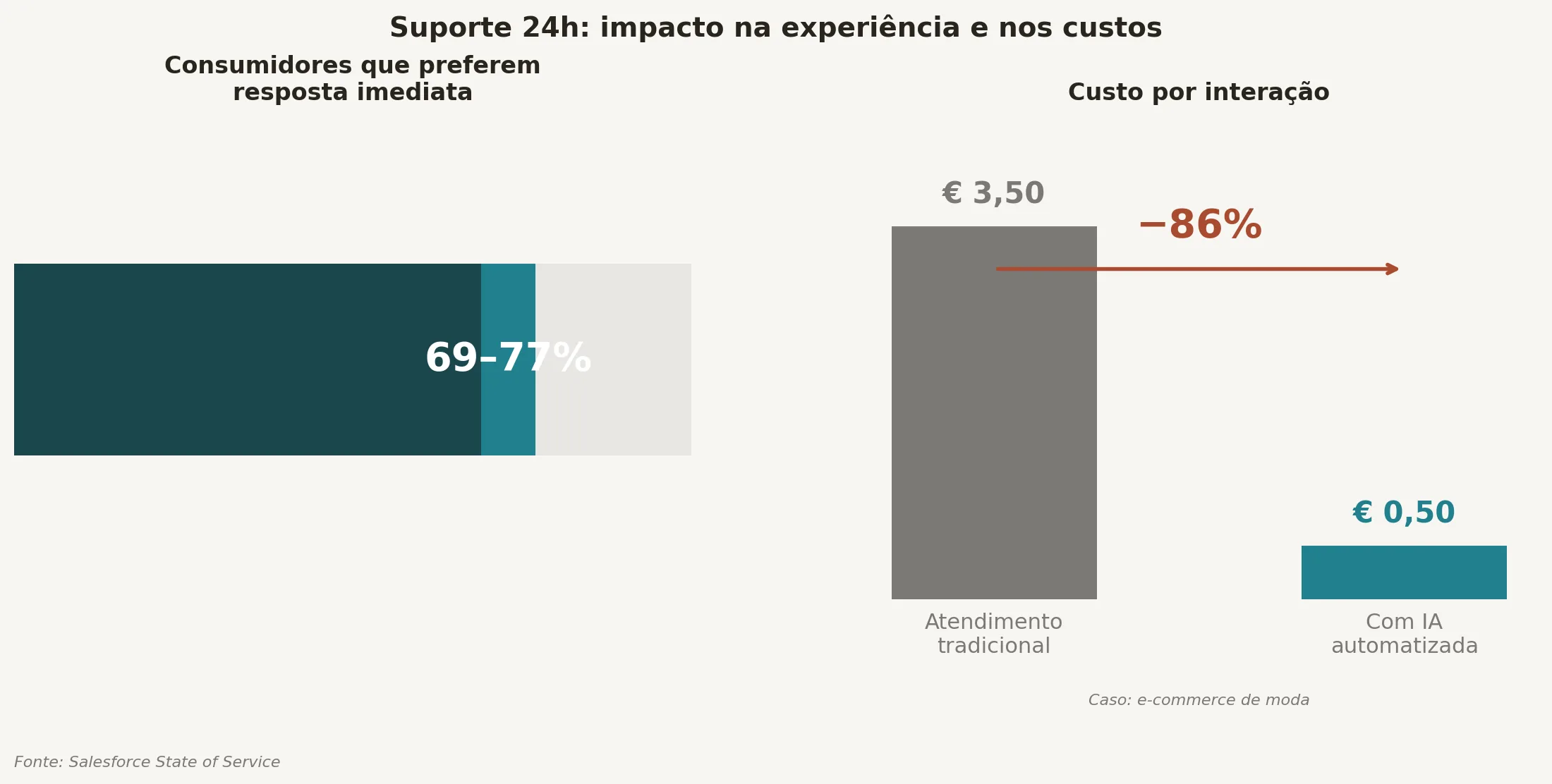
The main value of a virtual assistant in customer service isn't replacing people; it's guaranteeing permanent cover outside business hours. A Salesforce State of Service survey found that between 69% and 77% of consumers prefer immediate responses, whatever the time of day. A fashion e-commerce business that implemented automated service brought its cost per interaction down from €3.50 to €0.50; customer satisfaction, measured by CSAT before and after implementation, remained stable over the same period.
Personalisation based on customer history
An agent integrated with the CRM can greet the customer by name, reference previous purchases and anticipate common queries based on each user's profile. This level of personalisation isn't cosmetic: it reduces the volume of escalations to human agents and directly increases CSAT. Customers who feel the company knows them are less likely to abandon the conversation before their problem is solved, which translates into fewer reopened tickets and a lower cost per resolution.
Intelligent escalation: when the agent knows it doesn't know
One scenario many implementations overlook at the outset is contextualised escalation. An agent properly configured for AI in CX doesn't just resolve, it also recognises the limits of its scope and hands the conversation over to a human with all the context already loaded. This spares the customer from having to repeat themselves and turns the transition from automation to human service into a coherent experience rather than a frustrating break.
How to integrate AI agents with your CRM and knowledge base
The technical side is what most intimidates anyone considering this implementation. In practice, the flow is simpler than it looks, as long as data quality is in order before you connect anything.
The technical integration flow via APIs and connectors
Integration between the AI agent and the CRM happens via API or through automation platforms such as Make, Zapier or N8N, which act as intermediaries between systems. The basic flow is this: the agent receives the customer's message, queries the CRM in real time for context, responds with personalised data and logs the interaction back into the system. Platforms such as HubSpot, Salesforce and Zoho CRM have native integrations with AI tools, which considerably simplifies the initial setup, and each platform's integration documentation is the most direct starting point for assessing the real technical effort involved. To explore specific integration features between CRM and AI tools, take a look at material on CRM with AI tools, which explains practical options and technical requirements.
Best practice for clean data and effective synchronisation
The quality of the integration depends directly on the quality of the data in the CRM. Before connecting any agent, audit and standardise the existing fields, remove duplicates and define which system is the source of truth for each type of data. This step is often underestimated, and it's where most projects hit their first delays.
The knowledge base, including FAQs, manuals and internal policies, also needs to be organised and up to date. In practice, an agent that accesses outdated information will produce wrong answers more often than would be acceptable, which, in our experience, undermines user trust in the system faster than any technical failure.
The 4-phase implementation plan
This plan was designed to minimise risk and maximise learning. Each phase has a clear duration and objective, and none should be skipped, not out of methodological rigidity, but because each phase generates the data the next one needs to work.
Phase 1: proof of concept with a narrow scope
The first step is to identify the 5 to 10 most frequent question types in your customer service, applying the 80/20 rule. With that list, you build a structured support base, what we internally call the “support bible”, and configure a pilot agent on a single channel, whether that's website chat or WhatsApp. The goal isn't perfection: it's to validate that the agent resolves more than 70% of simple cases, a benchmark in line with proof-of-concept recommendations for implementations of this kind. Suggested duration: two weeks.
Phase 2: training and configuration with the brand's identity
In this phase, you define the agent's identity: name, tone of voice and clear escalation rules for when to hand over to a human, detected signs of frustration, requests outside its scope or higher-value transactions. The agent is trained on real conversation examples, not hypothetical scenarios. You connect the priority channels and test with a controlled group of users before any public launch.
Phase 3: progressive rollout and active monitoring
The launch happens in stages: in the first week, the agent only operates outside business hours. In the following weeks, coverage expands gradually, with continuous monitoring of the metrics. A progressive rollout protects the customer experience during the transition and allows quick adjustments before the agent is handling 100% of traffic. This is also the phase where the cases the initial training didn't cover start to surface, and that information is valuable.
Phase 4: ongoing maintenance and knowledge base updates
An AI agent isn't a project you set up once and forget. The knowledge base should be reviewed monthly, or whenever there are changes to products, prices or policies. Analysing the conversations where the agent failed is the most valuable source of continuous improvement: it's that data that shows where training needs reinforcing and, often, reveals patterns of queries the product team hadn't yet identified.
The metrics for measuring real impact on customer service
Implementing without measuring means wasting the chance to learn. There's a set of indicators that should be configured before launch, not after, because without a baseline there's no way to demonstrate impact.
Effectiveness and resolution: FCR, containment rate and escalations
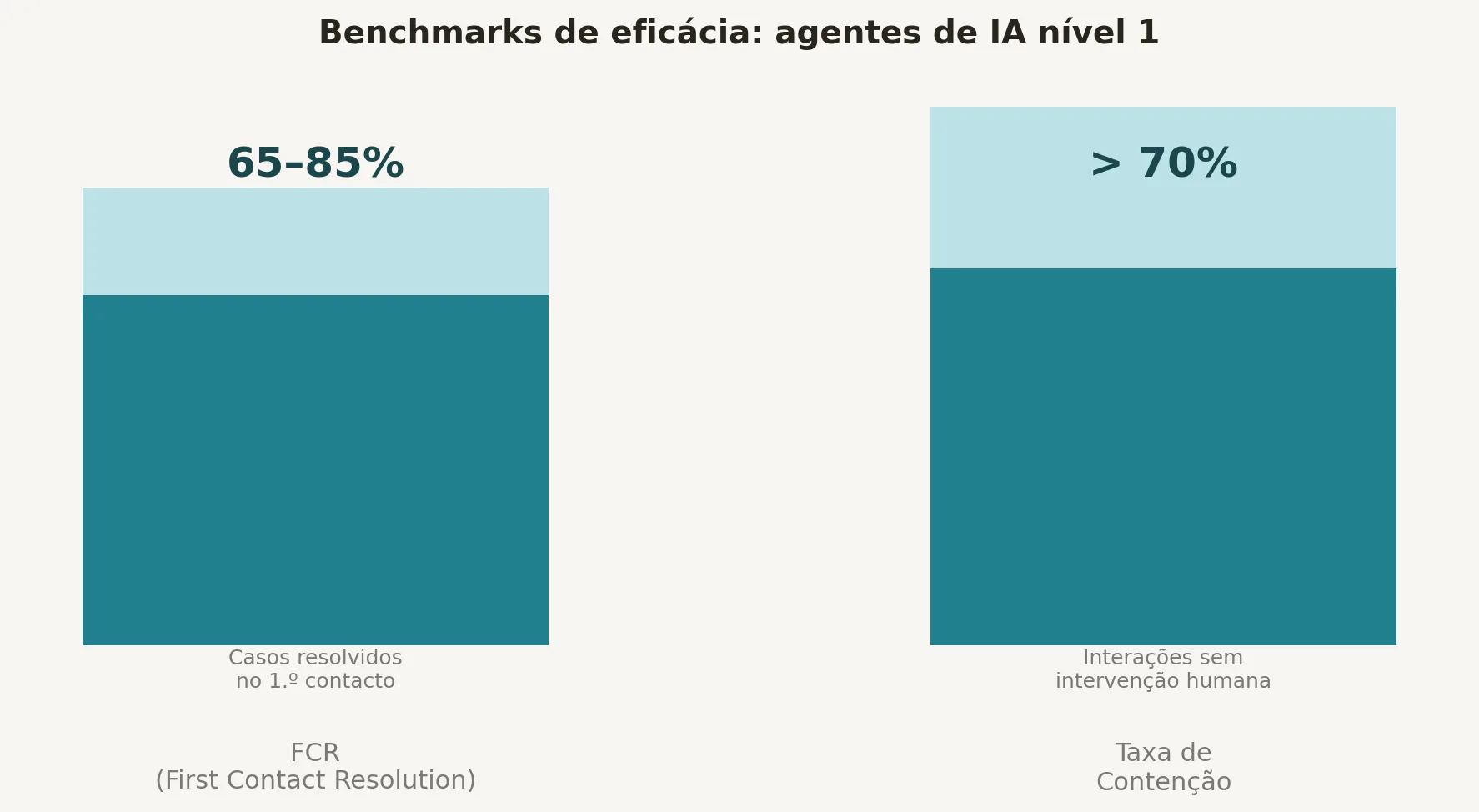
FCR (First Contact Resolution) measures the percentage of cases resolved on first contact. A well-configured agent should achieve between 65% and 85% resolution on tier 1 cases. The containment rate, the percentage of interactions resolved without human intervention, should stay above 70% for the implementation to be scalable. A persistently high escalation rate is a clear sign that the training or the scope needs revisiting; it isn't a failure of the concept, it's useful information.
Satisfaction and efficiency: CSAT, NPS and cost per conversation
CSAT measures post-interaction satisfaction on a scale of 1 to 5; NPS assesses likelihood to recommend. High automation can't come at the expense of these metrics: if CSAT drops after implementation, the problem lies in the quality of the responses or in the escalation rules, and that's where the investigation should start, not with the technology itself.
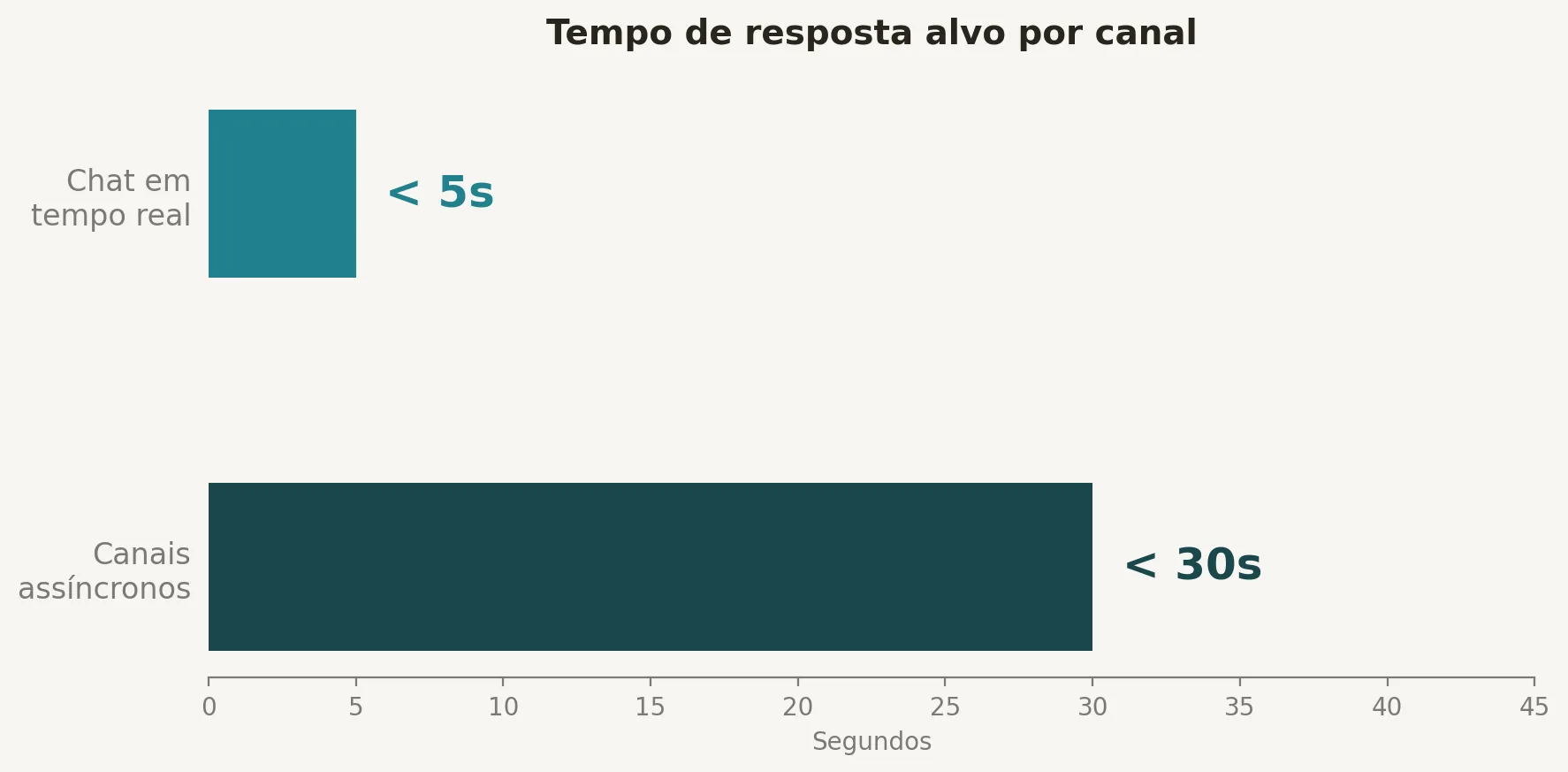
On speed, reference benchmarks point to response times of under 5 seconds in live chat and under 30 seconds on asynchronous channels. Cost per conversation is the most direct financial indicator of ROI: any consistent reduction in this metric translates directly into impact on the operating result.
How to choose the right partner to implement AI in customer service
Technology is rarely the main obstacle in an AI agent implementation. The biggest risk is moving forward without a structured plan and without specialist support in the first few weeks, which are the most critical and the ones that most influence internal adoption.
What to look for in an implementation partner
There are three criteria that, as we see it, make the difference between a project that takes off and one that stalls after the pilot.
The first is proven experience in technical CRM integrations, not just theoretical knowledge of the tools, but a real track record of configurations in production environments. The second is the ability to train the agent on the company's real data, not on generic content that reflects neither the vocabulary nor the concrete cases of the business. The third is post-launch support, with metric reviews: a partner who delivers only the technical setup, with no strategy, will leave the company without direction when the first problems appear. Sector experience also counts, implementing for a clinic is different from implementing for an e-commerce business.
How a specialist agency speeds up the process
Working with a team that combines strategic consultancy with technical integration capability saves months of trial and error. At JELLY, we develop practical AI agent implementation pilots that combine customer service automation, CRM integration and training on the company's knowledge base. Based on our experience with clients, this model tends to deliver operational efficiency from the first month, without forcing the company to build an in-house technical team. The structured pilot model was designed precisely to validate results before any larger-scale investment.
Conclusion: how to use AI to improve customer service, and where to start
Knowing how to use artificial intelligence agents to improve customer service is no longer a question of future vision. It's an operational decision with measurable ROI, documented cases and technology available at costs that make sense for companies of all sizes. The safest route is the one this article has described: choose the right type of agent for your context, make sure your CRM data is clean, launch a pilot on a single channel and expand based on metrics, not intuition.
The concrete next step is to map the 10 most frequent questions your customer service team receives this week. With that list, you already have the scope for your pilot. With the pilot, you already have the data to decide how to scale, and to justify the investment internally with real numbers. For further context on AI agent adoption and its impact on companies, see Google Cloud's study on AI agent adoption, which sets out global trends and results.
If you'd like to speed up this process with a plan designed specifically for your business, talk to the team at JELLY. We design the pilot, configure the integration and support you through the first 30 days to make sure the results arrive on schedule.
Other related articles:
- Lead Nurturing
- The end of SaaS as we know it
Get what we write
No fixed calendar: only when there is something worth your time.

Gonçalo Malho Rodrigues
Fundador & CEO
Fundou a Jelly – Digital Agency em Portugal em 2010 e a Strivesync – AI-Native Systems no Dubai em 2026. Detém outras empresas, noutros setores, como a Stronddo – Online Art Galleryl, a Scallent – Human Talent. Gonçalo, criou a The Change Framework, que apoia líderes a gerar a mudança através da mobilização de equipas em torno de uma causa.