Google Analytics 4: what changes in July?

Sandra Caravana – Copywriter –
If you're not using Google Analytics yet, here's how you should be.
If you're already on first-name terms with Google Analytics, here's what's about to change.
Google Analytics (GA) is a free data analysis tool from Google. It allows website and mobile app owners to gather and analyse data on user behaviour, such as how many people visit the site, where they come from, which pages they visit, how long they spend on the site and what they do there – their actions.
Sandra Caravana – Copywriter –
If you're not using Google Analytics yet, here's how you should be.
If you're already on first-name terms with Google Analytics, here's what's about to change.
Google Analytics (GA) is a free data analysis tool from Google. It allows website and mobile app owners to gather and analyse data on user behaviour, such as how many people visit the site, where they come from, which pages they visit, how long they spend on the site and what they do there – their actions.
This information is valuable to businesses and digital marketers, because it helps them understand how users interact with the site and how to optimise the customer experience. Google Analytics is used all over the world and is one of the most popular web analytics tools out there.
But if you have a website, you already know this.
As well as Google Analytics, website owners get free access, through Google, to Google My Business, Google Tag Manager and Google Optimize.
If your site already runs this kind of data analysis, you'll be familiar with the term Universal Analytics (UA), the version currently live.
Why does having a UA account matter so much?
So you can advertise and be present on SERPs: Search Engine Results Pages, the results pages of search engines like Google, Bing or Yahoo – with Google the star of this article, since it's the most-used search engine, accounting for 94% of all organic traffic on the internet.
Google is a byword for search.
If your site sells a product or service, you should have a Google Analytics account. Here are 5 reasons why:
- Track your site traffic: number of visitors, page views, visit duration and traffic source.
- Identify content performance: did that blog post work? Google Analytics will tell you.
- Improve marketing effectiveness: see which campaigns are driving the most traffic and conversions.
- Spot technical problems: such as slow-loading pages or tracking errors.
- Monitor your site goals: conversions, sales or newsletter sign-ups.
To get started with UA, all you need is a Gmail account and to follow the steps
here
. A code will be generated that needs to be added to your site's plugin or through Google Tag Manager. If a marketing agency or developer helped build your site, you can ask them for a hand.
If that's your situation, if you're only starting this journey now, you'll already have access to an interface similar to the one launching in July: the new GA4 – Google Analytics 4. Source: WeAnswer Google has built a new tool: GA4. It's more than an update. It's not just about making analysis more intuitive, with a more futuristic interface (it isn't, in fact), with fewer menus and ready-made reports than UA. It's about creating more tools to analyse the metrics and KPIs that matter to your business.
What's changing in GA to make it the analytics benchmark of the future:
- Real-time reports will give a full picture of user behaviour as it happens, while always preserving privacy. Critics will say this more sophisticated feature will only make sites slower.
- With privacy concerns growing, GA4 has been designed to sit better with privacy legislation.
- The new home page experience is personalised for customers. By default, the main dashboard picks up a set of metrics – highlighting key performance trends, real-time behaviour and the most-viewed reports – but it can be customised.
- Integrations and solutions that drive ROI: you'll be able to see campaign results across your website and your business app.
IMPORTANT:
If you have a Universal Analytics account, you need to migrate to GA4.
Google's warning: From 1 July 2023, all standard Universal Analytics properties will stop processing data. Universal Analytics 360 properties will stop processing data from 1 July 2024.
What do we analyse in Google Analytics?
Metrics.
But what are metrics?

No, it's not as complicated as the New York Stock Exchange.
Metrics help us make decisions based on real data, understand user behaviour, analyse and optimise investment, analyse and predict trends, and set goals. There's a strategy behind metrics and KPIs. Take the following scenario:
A room. A cake. Two boys. António ate the whole cake. Joaquim ate none of it. On average, each person in the room ate half a cake.
In a real metric, we know António went home satisfied and Joaquim went home starving.
Why did you invest in building a website? Do you want visits? Impressions? Clicks? Or is it sales? Conversions and leads?
The metrics you choose can depend on the type of business: B2B or B2C (there are plenty of others, but these are the two most common). What's the big difference? The audience, which changes everything the business does. B2B sells to companies, while B2C sells to end consumers. That means B2B has a more complex sales cycle and takes longer to close a sale. In short: the priority metrics will be different, and so will the sales funnel.

The great advantage of having a digital presence is that you can analyse everything. EVERYTHING.
Think of the street with the most traditional shops in your town. On the next sunny day, pop into a few of them. You'll certainly notice the pedestals by the door of each shop, the ones you'd recognise as security tag detectors: they go off, loudly, if you walk past them with a tagged item. But that's not their only job: these pedestals also work as people counters. Yes – when you see someone ducking down to get into a shop, it's so their entry isn't counted, to avoid skewing the visitor-to-customer average. In digital, though, you can't fool the counters.
GA lets you see and analyse the entire customer journey.
Are there differences in metrics between Universal Analytics and GA4? Google explains:
USERS
In Universal Analytics there are two user metrics: Total users and New users. In Google Analytics 4 there are three: Total users, Active users and New users.
In GA4, the main metric will be Active users: a user who has an engaged session. This version puts the value on event actions rather than impressions. The metric is available for websites, Android apps and iOS apps.
PAGE VIEWS
Everything stays much the same, but bear in mind that views will be counted across both website and app.
SESSIONS
UA uses a data collection model based on sessions and pages, while GA4 focuses on the flow of events rather than individual sessions and clicks. That means GA4 offers more flexibility and depth.
BOUNCE RATE
An engaged session is a session that lasts 10 seconds or longer, has 1 or more conversion events, or has 2 or more screen or page views. If a user doesn't have an engaged session (in other words, doesn't meet any of the criteria for one), Google Analytics counts the session as a bounce.
It's not a flattering metric, but it matters if your site has a blog: someone opened your page and closed it in under 10 seconds. What might be hurting your performance – the image, the headline?
EVENT COUNT
An event is an action a user takes on your site or app. Events can be almost anything, from button clicks to completed purchases. Each event is made up of a name and a set of parameters, which provide extra information about it.
Unlike UA, GA4 is built on the flow of events rather than sessions and page views. That means events are the basis of analysis in GA4 and can be used to understand how users interact with your site or app.
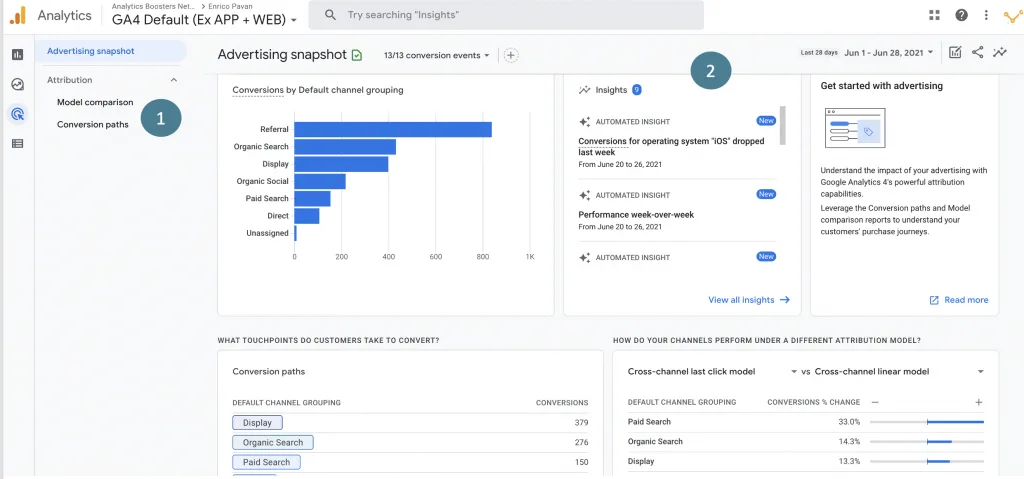
And what about ads?
Another big advantage of GA4 is its integration with Google Ads and other Google advertising platforms. GA4 lets your business build and use more precise, segmented audiences in its ad campaigns. It also gives a fuller view of ad conversion data, so companies can identify which campaigns deliver the best return on investment (ROI).
All of this adds up to a better-built audience. You'll know who's viewing your content and what actions they take, without vanity metrics, so you can target your campaigns more effectively.
Google Analytics 4 is a significant step forward from Universal Analytics, especially in event analysis and user-centred data analysis. GA4's new data model also helps address a limitation in UA's data collection, where data from users who switched devices or used different browsers wasn't attributed to the same person.
Overall, GA4 is more event-driven and offers more flexibility for custom analysis than UA.


Get what we write
No fixed calendar: only when there is something worth your time.