The Importance of Video in Digital Marketing

Marta Peral Ribeiro (Communications Consultant)
Why is video so important in digital marketing?
Tutorials, live streams, animations, motion graphics, interactive pieces… video is one of the most successful trends of the digital age. It's a brilliant way to grab a user's attention, get them involved and put your message across concisely. Here are the main advantages of this versatile, highly effective tool.
Why is video so important in digital marketing?
Tutorials, live streams, animations, motion graphics, interactive pieces… video is one of the most successful trends of the digital age. It's a brilliant way to grab a user's attention, get them involved and put your message across concisely. Here are the main advantages of this versatile, highly effective tool.
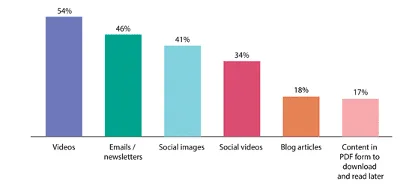
The data doesn't lie. Here's what consumers prefer:
Source: HubSpot
What are the main advantages of using video?
If a picture is worth a thousand words, a video is worth more than a still image. Moving images capture attention.
We know from our own experience that when we scroll through a social media feed, our curiosity is far greater when there's a video.
Likewise, when we're looking for an app, we're more likely to click on one that has a demo video. Because we get a better understanding of how a product or service works and what it does.
All because video combines elements that appeal to every kind of user, regardless of their culture, gender, age, interests and even their learning preferences.
Through video, a brand can present its product more quickly and more effectively. What's more, the content is easier to produce than with other formats.
All of this helps increase leads and deliver a financial return for your business.
Let's look at the facts…
According to this annual report on the use of video in marketing:
- 92% of marketers include video in their marketing strategy
- 89% of video marketers find that video generally delivers a good financial return.
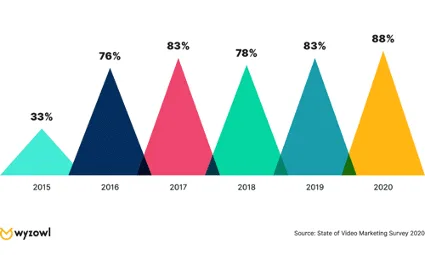
- 85% of companies use video as a marketing tool, a figure that has risen steadily since 2016, when it stood at 61%.
- The most widely used types of video are: explainers (72%), presentations (49%), testimonials (48%), sales (42%) and ads/advertising (42%).
- 96% of people have watched tutorials to find out more about a product or service.
- 84% of consumers have bought a product or service after watching a brand's video.
Types of video
Tutorial
For presenting any idea, concept, product, service, website or app quickly and concisely, and making an impact. This type of video sets realistic expectations for your audience about what can and can't be done.
Animation
To attract, explain and provide support. It can announce a product, explain how it works, advertise, and so on.
Interactive
To get the user actively involved in the video itself.
For example, the customer can buy products while watching the model walk in the clothes (by clicking on the item), choose their own adventure, fill in forms, answer questions, and so on.
Live
For when you want to create content that reaches a wider audience (on social media, for instance). And to give your brand a personal touch.
This is where you show the face (or faces) behind your brand, connecting with people on an emotional level. It helps build credibility and establish trust. And it's immediate in terms of recording and editing.
Motion graphics
To show how something works using animated graphics.
It can draw your audience in and explain something in a simpler, more entertaining way. Excellent for presenting an app, for example.
Examples of videos
- product/service/app demos
- advertising a new product
- recipe demonstrations
- “before” vs “after” reveals (a room makeover, etc.)
- testimonials
- interviews
- events
- social media
- teasers
- customer information (announcing a change or something new)
- vlog (videos linked to a blog)
- webinar (video conference with an educational purpose)
- storytelling
Where to start?
It's natural to feel awkward when creating your first videos, but remember you don't necessarily have to appear in them (or use your voice), and you don't have to produce them yourself either. We can help.
What is your product? A device, an object, an app? Could you make a tutorial showing how it works?
Start from the marketing strategy you already have and the content you've already created.
Answer the questions your customers or users tend to ask.
Make simple videos with the equipment you've got. Make the most of natural light, filters and angles.
Take advantage of the many video and image editing apps on the market (including those built into the social networks themselves).
Be consistent. As well as strengthening your relationship with the people watching, it creates a sense of closeness and invites people to get in touch.
Try videos without sound. This is a growing trend. Many users prefer to mute videos. And if they have subtitles, better still.
Find your customers where they already are: on social media.
Where to publish?
- YouTube
- Facebook (Facebook Live)
- Instagram (IGTV)
- TikTok
- On your own website or blog, or on partners' sites
Is video really worth investing in?
If you still had doubts about the financial return video can bring your business, here's a chart to put your mind at rest:
Final tips
Make the most of this excellent resource to create or improve your remarketing strategy, and use it across the different advertising platforms, whether Google or social media.
Repurpose the content. Video can be transcribed into text (blog, website), exported as podcasts, and published in different formats depending on the channel.
Restructure your website. The more videos you produce, the more categories you'll be able to identify. That can help you reorganise your website.
Keep your videos in folders. After a while, managing all the content you've produced can get confusing, and you risk repeating yourself. Use Google Drive, for example, to organise your videos and catalogue them by topic.
Write ideas down straight away. Video ideas will come to you when you least expect them. Make sure you have somewhere to note them down, whether that's your phone's notes app, a dedicated app or a notebook.
Encourage your users to share your videos.
Stay organised. Organising the material you produce is vital for categorising, reviewing and creating new content.
Stay one step ahead. Grow your business now and take it to a whole new level of visibility.

Get what we write
No fixed calendar: only when there is something worth your time.